We’ve all been there. You have a specific image—maybe a 2-inch passport photo, a credit-card-sized ID, or a logo that needs to be exactly 5cm wide.
You hit Ctrl+P, and your operating system takes over. Suddenly, you are faced with two terrible choices:
- “Fit to Page”: Your tiny logo is blown up to the size of a dinner plate, pixelated and useless.
- “Fill Page”: Your image is cropped, losing the most important details.
Why is it so hard to just put an image in the top-right corner of a piece of paper?
That frustration is exactly why I built PrecisionPrint A4.
🔗 Try it live: https://precision-print.chaosparks.com/
💻 Source Code: https://github.com/chaosparks/precision-print
What is PrecisionPrint?
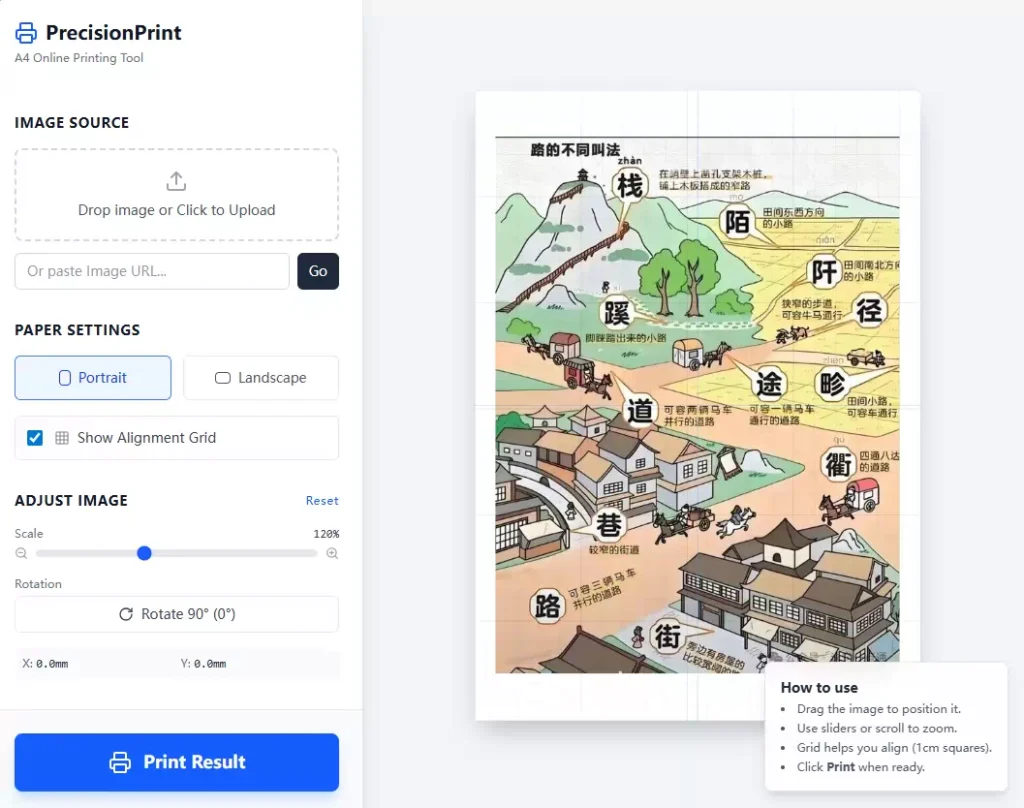
PrecisionPrint A4 is a “What You See Is What You Get” (WYSIWYG) editor specifically designed for printing on standard A4 paper.
Unlike standard image viewers that treat printing as an afterthought, PrecisionPrint treats the A4 sheet as a canvas. It allows you to place your image exactly where you want it, at the exact scale you need, and sends it to the printer without any hidden scaling or cropping.
Key Features
1. 📏 Millimeter-Perfect Sizing
Say goodbye to vague “Small”, “Medium”, and “Large” settings.
PrecisionPrint uses a Scale Slider that adjusts your image size based on real-world measurements. The rendering engine is calibrated to millimeters.
- Need the image to be 50% of its original size? Just slide it.
- Need to fit specific dimensions? Adjust visually against the grid.
2. 🎯 Drag & Drop Positioning
Stop wasting paper by printing a tiny image in the dead center of the sheet.
PrecisionPrint supports full Drag & Drop.
- Want to print a label in the top-left corner so you can reuse the rest of the paper later? Just drag it there.
- Need to rotate it 90 degrees to fit a landscape image? One click.
3. 🕸️ The Alignment Grid
To help you measure without holding a ruler up to your monitor, the canvas features a toggleable 1cm x 1cm grid overlay. This makes alignment and size estimation intuitive and instant.
4. 📄 Pure, Clean Output
Web printing is notoriously messy—headers, footers, and URLs often clutter the page.
When you click “Print Result”, PrecisionPrint generates a dedicated, clean popup window optimized specifically for the @media print CSS query. It bypasses browser margins to ensure that what you saw on the canvas is exactly what comes out of the machine.
How It Works (Under the Hood)
For the developers out there, this project is open source and built with a modern stack:
- React 19: For a responsive, state-driven UI.
- TypeScript: For type safety and robust logic.
- Vite: For lightning-fast builds.
- Tailwind CSS: For clean styling.
The core challenge was mapping CSS pixels to physical millimeters (mm) across different screen densities, ensuring that the “preview” accurately reflects the physical A4 output.
Try It Out
Next time you need to print a specific image without the headache of auto-scaling, give it a try.
👉 Live Demo: precision-print.chaosparks.com
⭐ Star on GitHub: github.com/chaosparks/precision-print