Have you ever broken your app’s monetization because of a single missing character?
It’s a mobile developer’s nightmare. You ship your app, traction looks good, but your AdMob revenue is flatlining at $0. After hours of debugging, you find the culprit:
You missed the last digit when copying the ca-app-pub- ID.
Or maybe you pasted the App ID into the Ad Unit ID field.
Or perhaps you accidentally added a hidden whitespace character.
These manual copy-paste errors are incredibly common, yet they are costly. They require a hotfix, a new build, app store re-submission, and forced user updates.
Coding shouldn’t be a spelling test.
That’s why I built Code Generator for AdMob — a Chrome extension designed to make AdMob integration bulletproof.
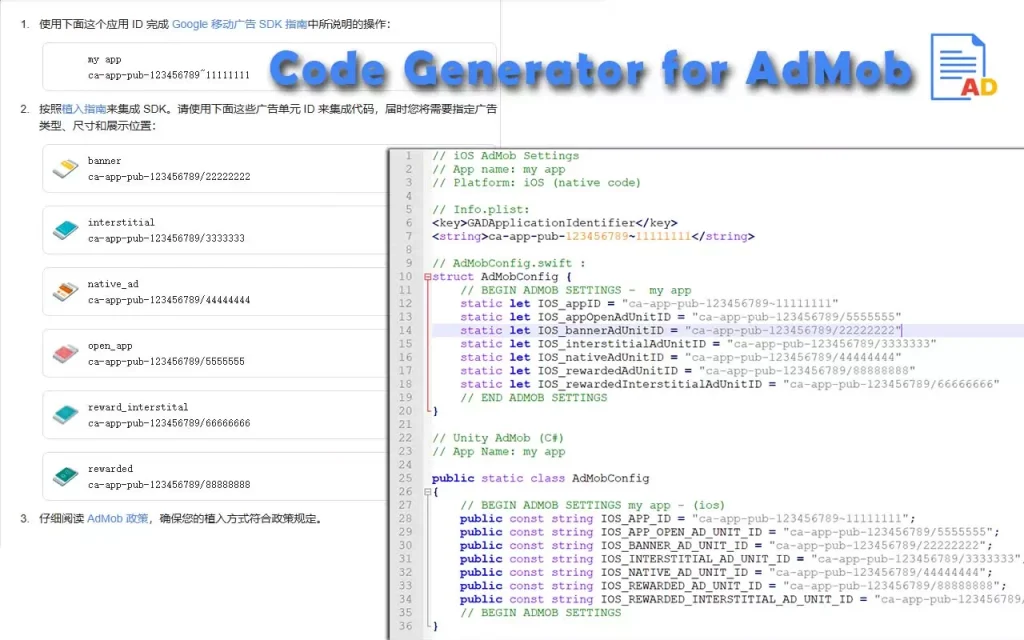
🚀 What does it do?
It streamlines the workflow between your AdMob setup email and your codebase. No more manual copying of long, confusing strings.
- Visual Feedback: It automatically scans your current tab (like your Gmail) and highlights valid AdMob IDs visually. You can verify instantly that the right data is being captured.
- Multi-Language Support: It generates ready-to-use code snippets for Java (Android), C# (Unity), and Swift (iOS).
- Error-Free: It strips out accidental whitespaces and validates the format before generating the code.
🛡️ Privacy First
I built this tool for developers, by a developer.
- 100% Local: All processing happens right in your browser’s side panel.
- Zero Data Collection: Your AdMob IDs and email content are never sent to any server.
⚡ Workflow Upgrade
- Open the email containing your AdMob IDs.
- Open the extension Side Panel.
- Watch the IDs light up on the page.
- Click “Copy” on the generated Java/Swift/C# code.
- Paste it into your project. Done.
Stop wasting time debugging config strings.